Sometimes the so-called easy boxes can prove to be the trickiest even though, once the vectors are found, they were quite easy after all. Such is the case for this box.
I booted up and launched my nmap scan with some immediate results:
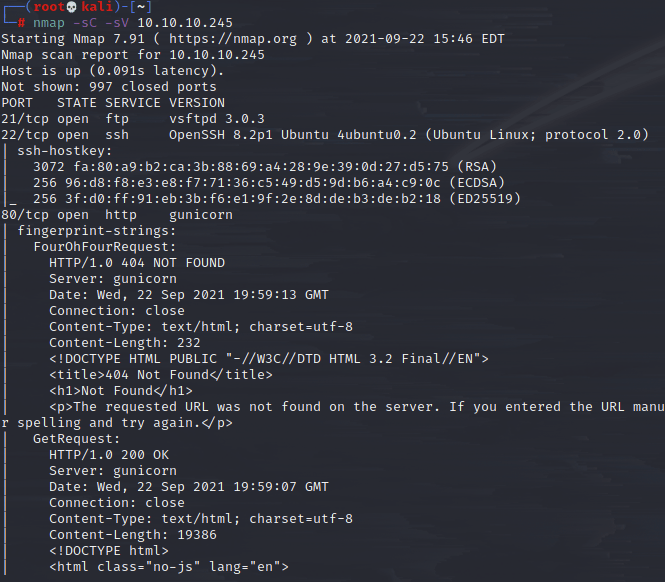
FTP, SSH, HTTP server all running. I skipped over ftp for now since the nmap scan I ran would have usually told me if it allowed anon access, so thinking it doesn’t, I move over to the web server.
I went ahead and ran a gobuster scan but I found my results weren’t particularly interesting immediately, so I navigated to the page and began clicking around to see what could be manipulated.
I noticed I was logged in automatically as this user nathan, but it wouldn’t let me log out or anything, so it seems like that wasn’t the way in.

There wasn’t much else to see, though this seems to be an interface for monitoring connection data (notice the PCAP analysis). There’s also a download link here.
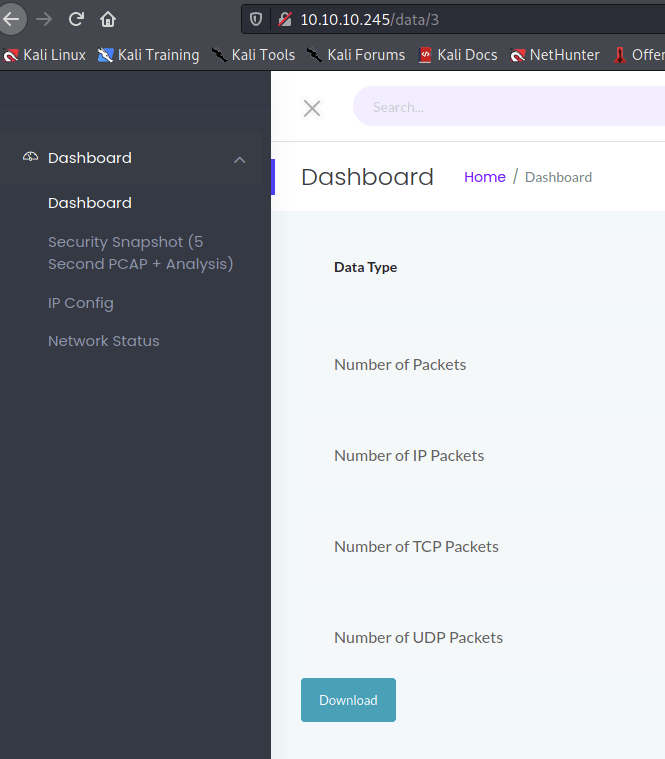
I clicked and it downloaded a pcap file. This current one only shows me information on my own connectivity though, so not very useful. However, I noticed in the url parameter that the entry was number coded, so I try to enter 0 as the earliest as I could back to and download that one. It allowed it.
I quickly scanned through the information there and was able to see nathan logging into the ftp client, and since this was not secure I could read the plaintext of his password!!

I went ahead and used this to login to ftp:

I was in the directory /user/nathan, so I immediately got the user flag, but now what?
I was actually able to get the /etc/passwd file off the machine, but it didn’t prove useful. I also was not allowed to put anything on the server here, so no dice on a potential reverse shell that way.
I decided to go back to the other open port, SSH, and try the same credentials there:

And it worked!
And here’s where it got a bit tricky. I tried all the usual suspects, checking group, user ids, system info, uploading files, checking sudo commands. Seemed I was getting nowhere. However, going through my list of potential basic escalation vectors, and knowing this was allegedly an easy box, I assumed I wouldn’t have to go through too many hoops to be able to pull this off.
After a while I got to the Linux Capabilities and decided to enumerate this:

It seems like python has the ability to change uid from this output, so I head to GTFOBins and look up Python. Sure enough, there’s an escalation vector for the Capability here, so I try it:

And I instantly have root! From here of course I could look around and get that root flag.
 A Cyber Journey